3 Steps Ahead Founding beta 0.1.133

3 Steps Ahead Free MTG Arena deck tracker, deck builder and analyzer · Windows

Founding beta · 50 spots

The free Arena tracker that shows why you win and lose.

Track every game you play on Arena for free: win rate by deck and opponent, a replay of every game, and your deck on a board next to your collection. Then go further: ask your games a question (on the draw, 3 lands in hand, no mulligan) and see which decisions cost you wins.

FreeNo account neededReads only your local Player.logNever clicks or types in the game
Leak Finder: a question built from filters (on the draw, 3 lands in hand, no mulligan) and its answer
Highlights

Read your games. Build your deck.

Leak Finder · Filters

Ask your games a question

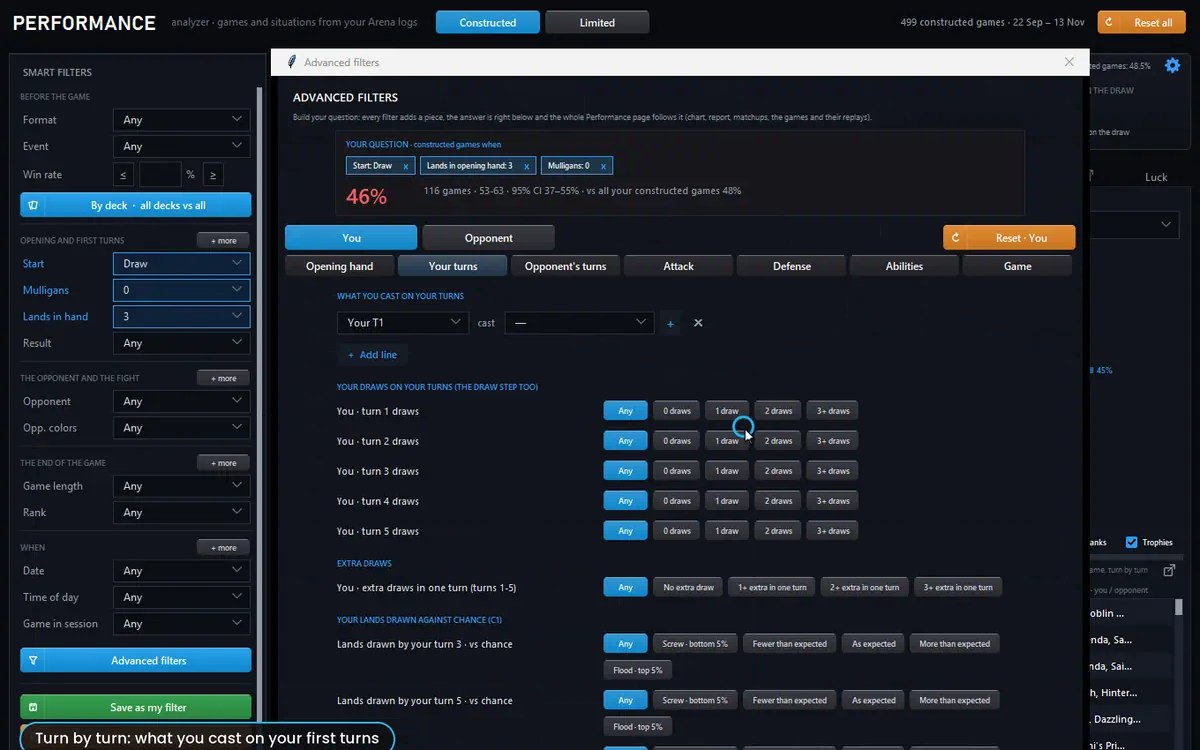
Build it one filter at a time: on the draw, 3 lands in your opening hand, no mulligan, what your opponent cast on its turn 2. The answer sits right there, win rate and record with how sure it is, and the chart, the report, the matchups and the games underneath all follow. Ready-made searches for the usual doubts, the cost of each decision, your leaks, your luck with lands.

Read the guide: Leak Finder →
Ask your games a question: on the draw, 3 lands in hand, no mulligan; the Advanced filters window shows the question and the answer, and the whole Leak Finder page follows.
Three filters, then the question and the answer in Advanced filters, and the page that follows.
Replayer

Every game, action by action

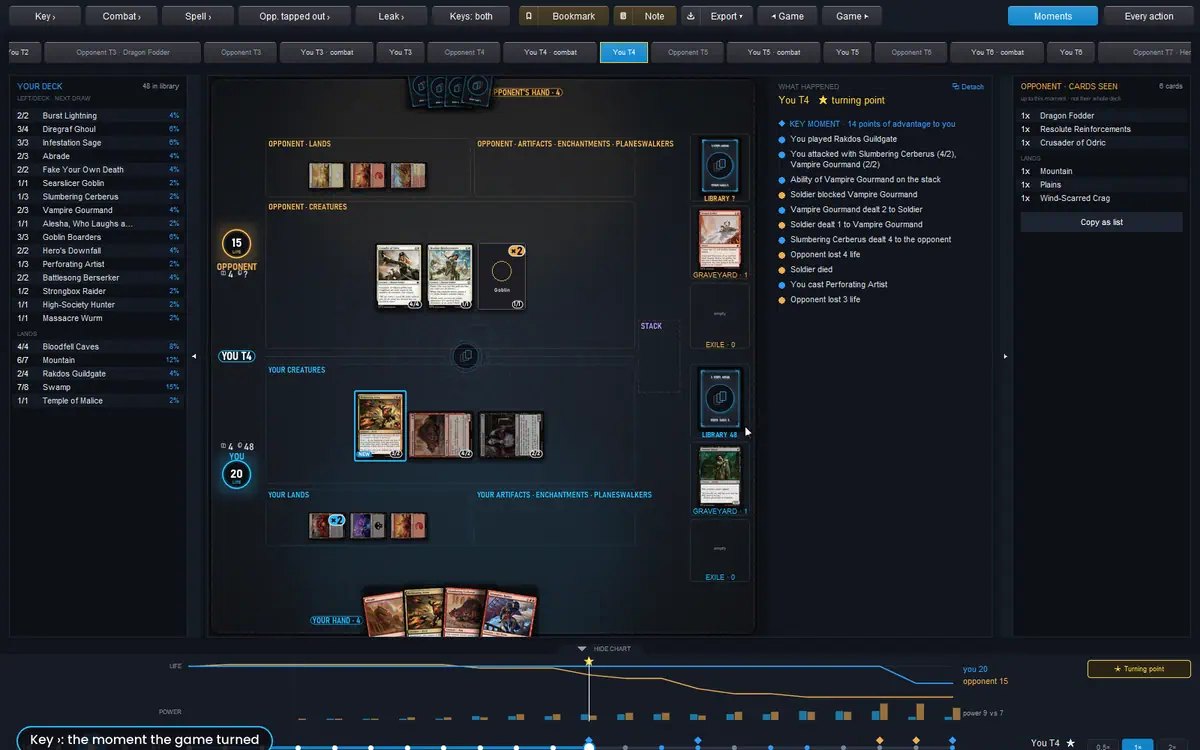
Any game from your log on a table: both battlefields, graveyards and exile, both decks with your draw odds, arrows for blocks and targets, the key moments, your leaks, bookmarks, export and playlists.

Read the guide: Replayer →
Every game, action by action: the opening hand, the key moment, every action.
From the opening hand to the key moment, then every action.
Deck builder

Build it over your collection

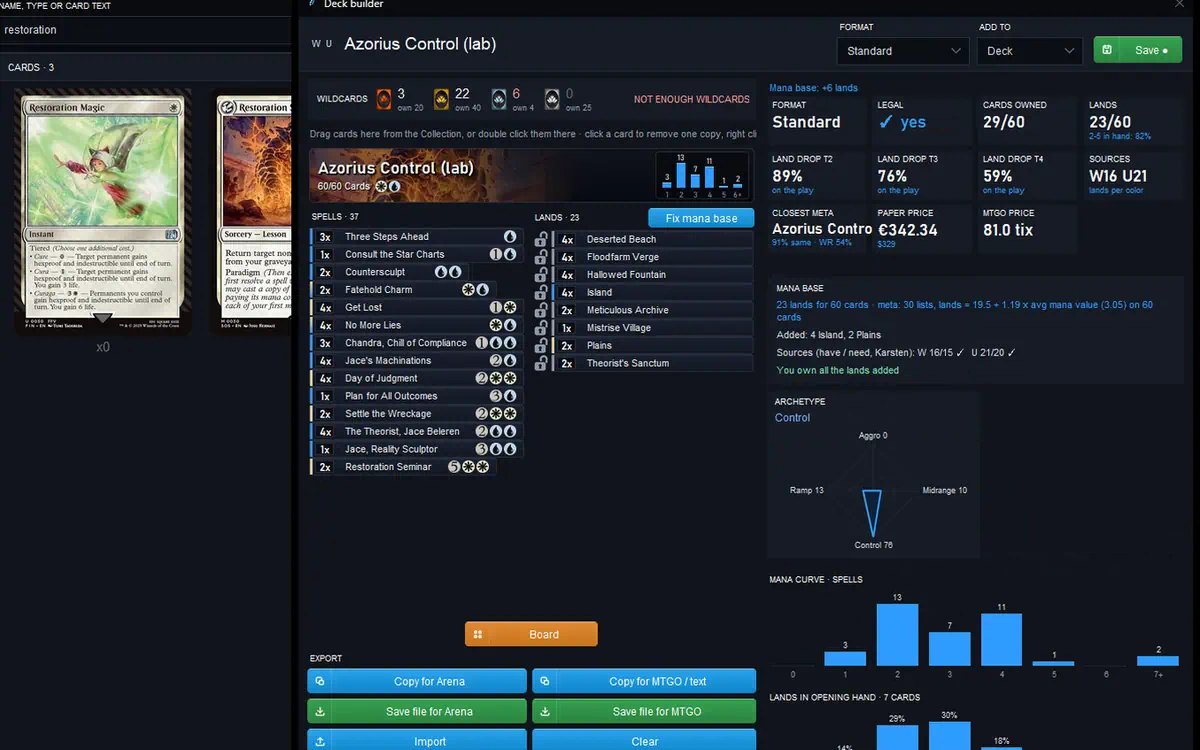
The builder opens over your collection: search by name, type or rules text and double-click or drag cards in. Every change redoes legality, land drops, curve and the closest meta deck. Mana base adds the lands it needs.

Read the guide: Deck builder & mana base →
Change it over your collection: Three Three Steps Ahead and two Restoration Seminar in; a Fatehold Charm, two Countersculpt and eight lands out; Mana base puts the lands back.
Three Three Steps Ahead and two Restoration Seminar in; a Fatehold Charm, two Countersculpt and eight lands out; Mana base puts the lands back.
Board

Lay it out: synergies and groups

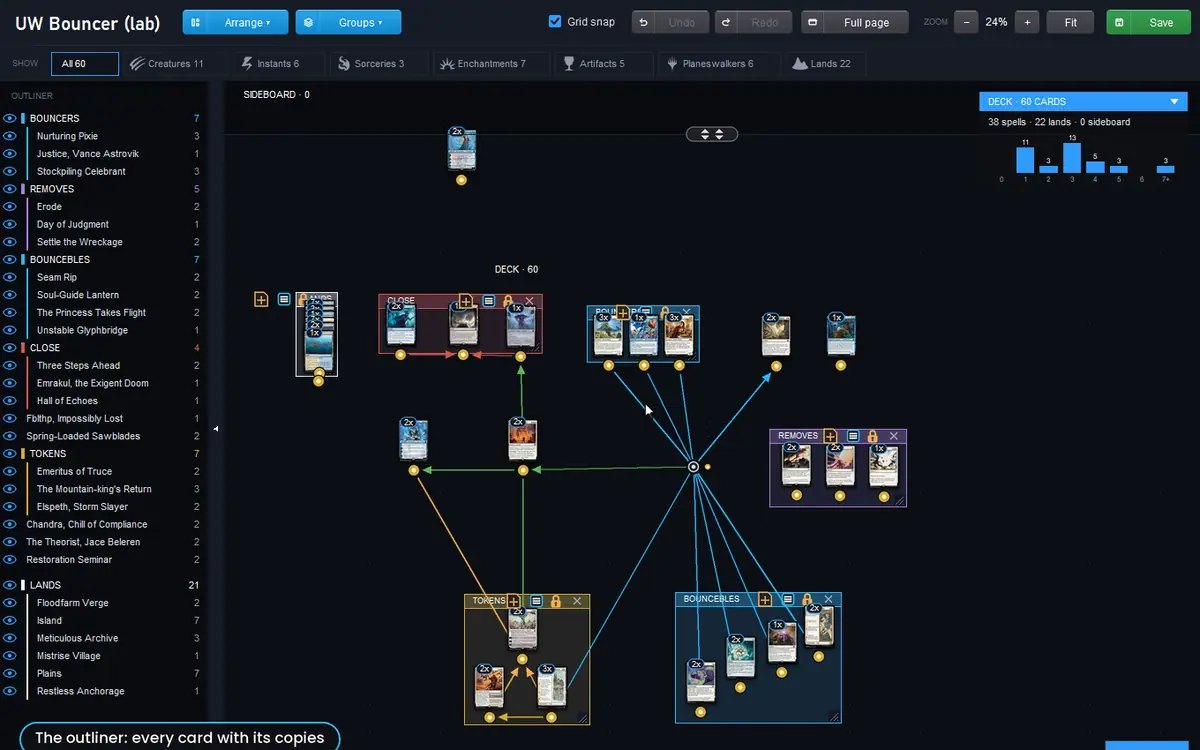
The deck as real cards on an endless sheet. Pull cards out of their piles or stack them, change copies, draw synergy arrows and give them colour and weight, break a line with a dot, swap a card for another, add one by name, box-select a group, name it and move it by its title.

Read the guide: Board →
Lay it out: synergies and groups: Everything the Board edits, sped up: one caption per action, two labelled groups at the end.
Everything the Board edits, sped up: one caption per action, two labelled groups at the end.
How it works

From any deck to your own, in four steps

Step 1 · Your decks

Start from a deck

Your Arena decks are already there, as cards with their real record. A list from Arena, MTGO or any site comes in with Import. The meta built from the games players share is coming.

Read the guide: Your decks →
Your decks: the decks you have on Arena, as cards with their record.
Your decks, as cards with their real record.
Step 2 · Wishlist

Pick your deck and wishlist it

One click keeps it in your wishlist, inside Your decks, next to the decks you already play, with the wildcards it still needs. A list from any site goes there too, with Import.

Read the guide: Your decks →
Pick your deck and wishlist it: Add to wishlist, then Your decks: Azorius Control is in the Wishlist group.
Add to wishlist, then Your decks: Azorius Control is in the Wishlist group.
Step 3 · Make it editable

Copy it to the Deck builder

The wishlist keeps the original. A copy in the Deck builder group is yours to change, and Edit opens it in the builder. (Edit on any meta deck does both at once.)

Read the guide: Your decks →
Copy it to the Deck builder: from the wishlist, Copy to Deck builder: the (lab) copy opens, ready to edit.
From the wishlist, Copy to Deck builder: the (lab) copy opens, ready to edit.
Step 4 · Stats

Read the numbers before you play

Legal or not, cards you own, land drops on turns 2 to 4, sources per colour, the closest meta deck, the archetype, paper and MTGO prices. Once you play it, your own games fill the rest.

Read the guide: Deck builder & mana base →
Read the numbers before you play: The saved build: deck build, archetype and prices.
The saved build: deck build, archetype and prices.
Also in the app

Everything comes from your own games

Deck HUD

Both decks, on top of Arena

While you play, a slim list on each edge of Arena: your deck card by card with the copies left and the chance to draw each one next, and the opponent's likely archetype, the spells it has played and the instants its open mana can pay. Clicks pass through; an eye folds each list. It reads decks, never players.

Read the guide: Deck HUD →
Both decks, on top of Arena: your deck on the left edge with draw chances, the opponent's archetype and played cards on the right, the eye folding a list, then the READY badge between games.
Both lists during a game, the eye folding yours, then the READY badge between games.
Analysis

The cards behind your results

For the decks you play: which cards win when cast, which stay in hand, which show up in your losses, and the opposing cards and pairs that beat you most. Hover a card to see it. Every number comes from your own log.

Read the guide: Deck analysis →
The cards behind your results: A deck you play: each category opened, and the card image on hover.
A deck you play: each category opened, and the card image on hover.
Collection

Every card, searchable

Every card on Arena, the ones you own in full colour. Search name, type and rules text, filter by format and see the banned cards of that format in red.

Read the guide: Collection →
Every card, searchable: Searching for “dragon”, then the cards banned in Standard.
Searching for “dragon”, then the cards banned in Standard.
Resources

Gold and gems with a plan

Monthly income from your log. Set a goal with the sliders and the farmer works out where to spend gold and gems; press Create and you get a day-by-day roadmap.

Read the guide: Resources →
Gold and gems with a plan: Moving the goals, then Create: the roadmap appears beside the farmer.
Moving the goals, then Create: the roadmap appears beside the farmer.

Read the full guide: every screen, button and shortcut

Coming next: the live drafter that picks with you, advice during your games, and a one-click installer.

Recorded from the real app on one player's account.

Founding testers

50 spots. Every tester gets read.

The app stays free for everyone. The founding beta is small on purpose: we read every game that comes in, and we give something back to the people who share them.

  1. A personal report on your games. Win rate on the play and on the draw, how your mulligans go, the spots where you lose the most. Written from your own games, for you.
  2. New features before everyone else. You get the next version before it is released, and a vote on what we build next.
  3. A direct line. A Founder role on the Discord and answers to your bugs and ideas from the person who writes the code.

To join, enter the Discord and introduce yourself: which format you play, how often, and what frustrates you most in your results. When all the spots are taken, new ones open with the next wave.

Install the beta

One file, one minute

  1. Download 3-Steps-Ahead-Setup.exe and run it. Everything is inside: no Python to install, no admin rights.
  2. If Windows says “Windows protected your PC”, click More info → Run anyway. The beta is not signed yet.
  3. In Arena, turn on Options → Account → Detailed Logs (Plugin Support), then play as usual.
  4. Start 3 Steps Ahead from the Start menu or the desktop. The first start downloads about 125 MB of card data from Scryfall and Arena's public card database.

Updates appear in the Help tab with a download button: run the new setup over the old one. Your data stays in the app folder.

Support the project

Free beta. Kept alive by players who chip in.

The beta is free for everyone: no plans, no paywall, nothing locked. If it helps you, a €2.99 donation, whenever you like, pays for hosting, data and development time.

€2.99 whenever you like · optional donation
Support page · coming soon Join the Discord
Questions

Before you install

Can I get in trouble with Wizards for using it?

The app reads the log file that Arena writes for trackers when Detailed Logs is on, the same file other popular trackers read. It never reads Arena's memory, never changes its files, and never clicks or types in the game. Outside help is not allowed in sanctioned competitive events such as the Arena Championship and its qualifiers: close the app for those.

Is it an MTG Arena deck tracker like Untapped.gg or 17Lands?

It reads the same Player.log those trackers read, and keeps the record of every game on your PC. Its focus is the deck: why it wins and loses card by card, building and changing it over your collection with a mana base calculator, and laying it out on a board with synergies. No account is needed; an Untapped.gg profile can be linked for the collection.

Which formats does it cover?

Your games in every constructed queue: Standard, Alchemy, Explorer, Historic, Timeless and Brawl, ranked or not. The meta will be built from the games players choose to share; the app does not ship other sites' statistics. Limited games are counted; the live drafter comes later.

Does it work on Mac?

Not yet. The beta runs on Windows 10 and 11.

Do I have to install Python?

No. The setup brings its own private copy, used only by the app. Download one file, run it, and it installs everything without admin rights.

Do I need an Untapped.gg account?

No. Your games, decks and analysis come from your own log. Arena's log does not list your whole collection, so if you want to see the cards you own and the wildcards your decks need, you can link your public Untapped.gg profile in Help.

Why is the beta limited to 50 testers?

So we can read every report and answer it, and give each tester a personal report on their games. Testers join on our Discord, where bugs and ideas are collected and you can follow what gets fixed. When the spots are taken, new ones open with the next wave.

Is it really free?

Yes, 100% of it, for everyone, during the beta. Donations (€2.99, whenever you like) are optional and do not unlock anything.

Where do I report a bug or suggest a feature?

On our Discord: type /bug or /suggest and fill in the short form. Others can vote on ideas there, and you can follow what gets fixed.

Where does my data go?

Nowhere, unless you say yes to sharing on first start. See the privacy section below.

Privacy

Your log stays on your PC unless you say yes

What the app reads
Your local Arena Player.log, to show your games, decks and resources. Nothing is read from Arena's memory or files, and it never acts in the game.
Sharing, off by default
On first start you choose whether to share game data to improve the app. You can change it any time in Help.
What is shared
Event, day, result, who started, mulligans, turns, your deck list, your kept hand and the opposing cards you saw.
What is never shared
Your in-game name, your account id and your opponents' names. Your account is replaced by a one-way code, so the data is pseudonymous.
Full notice
Read the privacy notice